
Reported on the spot.Handled before anyone complains.
Place QR codes at your locations and let anyone instantly report issues. No app downloads, no logins. Just scan and submit, and the right people get notified immediately.
How It Works
Place QR Codes
Generate and print QR codes for your locations. Stick them anywhere issues might occur.
Scan & Report
Anyone can scan the QR code with their phone to report an issue. No app or login needed. Reporting an issue takes only seconds.
Get Notified
The right team members receive email notifications for new incidents, based on incident type and location.
Use Cases
See how different organizations can use SitePling for incident reporting.
Office Building
Put up QR codes in meeting rooms or restrooms, and let employees report issues when they see them. The maintenance crew gets notified of the type of issue and the location it happened.
Campsite
Put up QR codes in public areas or cabins, letting guests report issues like broken equipment, no lights, or areas that need cleaning. Each type of incident alerts the right team automatically.
Residential Building Management
A housing co-op places QR codes in shared spaces like laundry rooms, parking garages, and hallways. Residents scan to report issues, and janitors are notified immediately. Board members can get weekly reports and view analytics data to track incidents over time.
Incident Categories
You decide what can be reported. Create your own incident categories and name them the way your team already talks about them. You choose which categories are available on the different locations.
A No toilet paper category can be offered in restrooms only, while Broken equipment shows up in meeting rooms and workshops. Reporters get a short, relevant list instead of a long one.
Catch Issues As Soon As Possible
Place SitePling QR codes throughout your facility and empower staff, visitors, or tenants to report problems the moment they spot them.
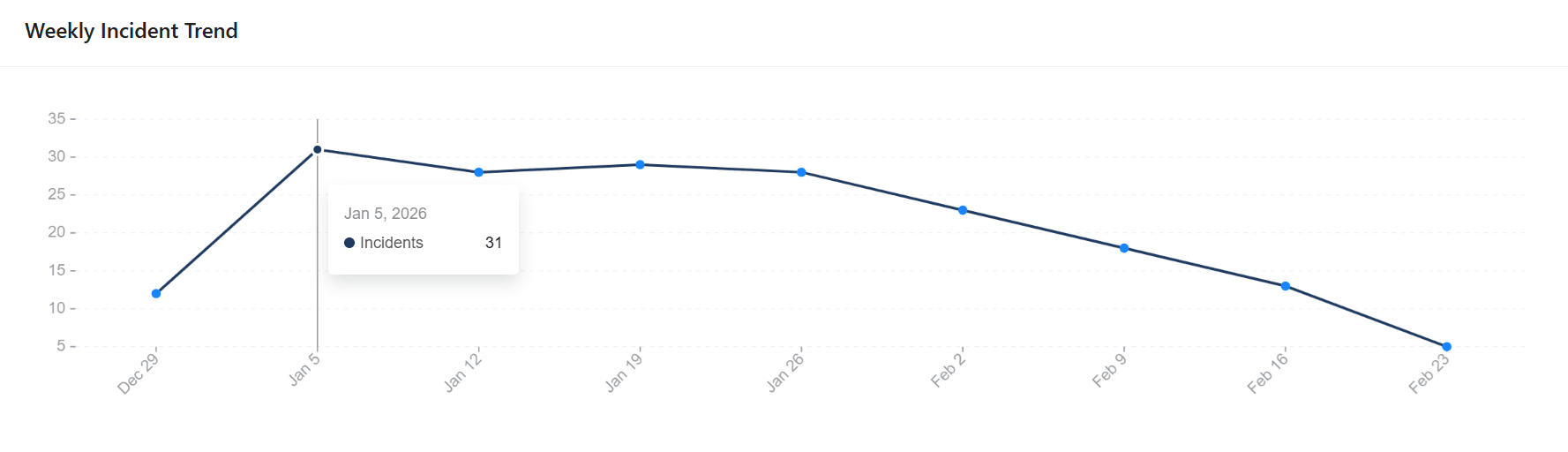
Track Incident Trends Over Time
Spot patterns in incident frequency and identify whether preventive measures are working. Weekly trend data helps you make data-driven decisions about your facility management.
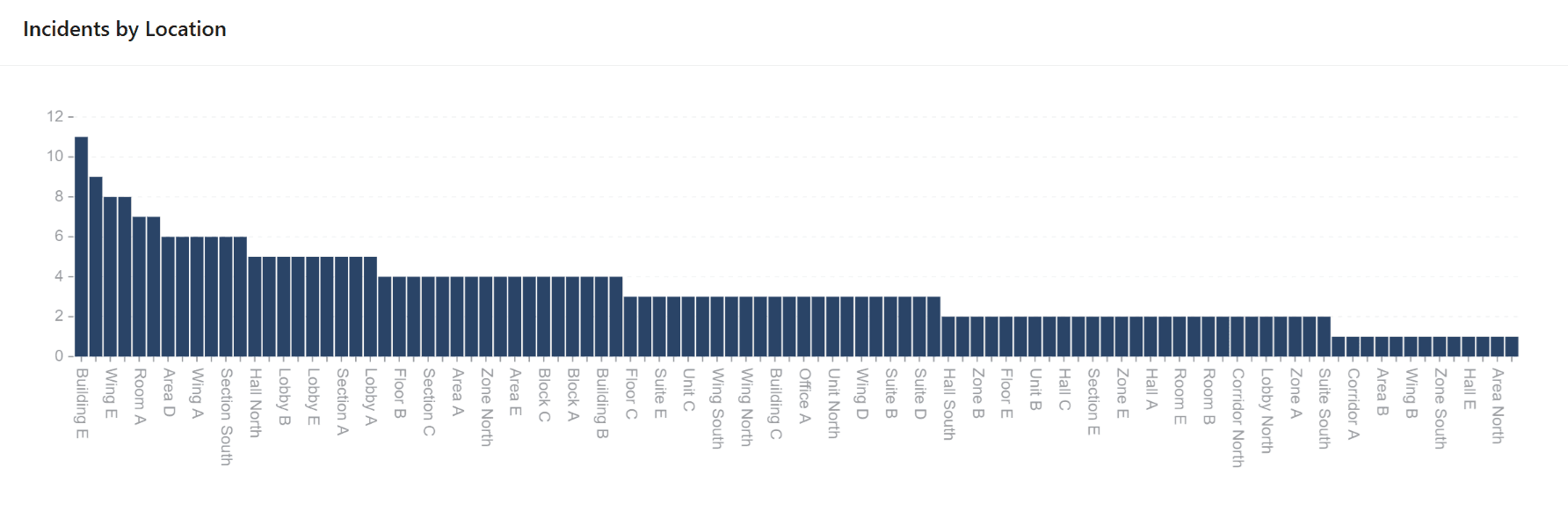
Compare incident frequency across all your locations or zones. Identify hotspots that need extra attention and allocate maintenance resources where they matter most.
QR Codes
SitePling generates a unique QR code for each of your locations. The code links to a dedicated reporting form for that location. Print it, put it up, and anyone on site can start reporting issues right away.
Simple, Transparent Pricing
Start free and upgrade when you are ready. No hidden fees.
Free
Try SitePling on a single location before you buy.
- ✓1 location
- ✓3 different recipients
- ✓10 reports total
- ✓QR code generation
- ✓Email notifications
- ✓Configurable recipients
Pro
Everything you need for incident reporting.
- ✓Up to 100 different locations
- ✓Unlimited recipients
- ✓Unlimited reports
- ✓QR code generation
- ✓Email notifications
- ✓Configurable recipients
Need more than 100 locations or custom functionality? Contact us.
Frequently Asked Questions
Got questions? We've got answers. If you don't find what you're looking for, feel free to reach out at contact@sitepling.com.
No. SitePling works entirely through QR codes and the web browser. Anyone can scan a QR code with their phone camera and submit a report instantly. No downloads or sign-ups required.
Yes. You can define your own categories to match how your sites work, for example "No Toilet Paper" or "Needs cleaning". Reporters pick a category when they submit, so every incident arrives already sorted, and you can route notifications based on it.
Yes. You can configure notification recipients per location and per incident category. For example, cleaning issues can go to your janitorial team while equipment problems go to maintenance.
Yes. Every location has its own recipient list, so reports only reach the people responsible for that site. The maintenance team of one floor can get everything from their own locations without being notified about any of the others.
Simply create a location in SitePling, and it automatically generates a unique QR code that links to a reporting form for that specific location.
Absolutely. You can add as many locations as your plan allows, each with its own QR code, recipients, and notification settings.
The configured recipients receive an email notification with the details of the report. This includes the indicent category, its location and any attached photo. You can view all reported incidents in the SitePling application as well.